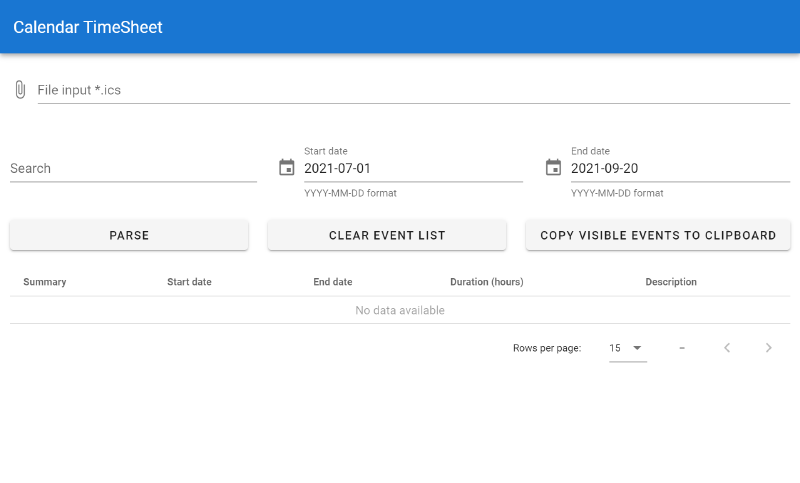
Consulting and project work often live in the calendar first: blocks for clients, meetings, and focus time. Turning that into a timesheet or a billing summary usually means retyping or awkward copy-paste from Google Calendar, Outlook, or Apple Calendar into a spreadsheet. Exporting iCalendar (.ics) is built into most of those products; the missing piece is a lightweight way to reshape that export into tabular data you can sum and attach to an invoice.
CalTS (Calendar TimeSheet) is a small tool I built for that workflow: parse an .ics file in the browser, inspect and filter events, then copy the visible rows to the clipboard for Excel, LibreOffice, or whatever you use downstream.
Why client-side only#
The calendar file often contains meeting titles, attendee hints, and locations—data you may not want on a random SaaS backend. CalTS runs entirely in the browser: you choose a file, parsing happens with JavaScript, and nothing is sent to a server. The trade-off is obvious: you need a modern browser and you are limited by local memory if someone hands you a multi-year, high-volume export. For typical monthly or quarterly slices, that has never been a problem in practice.
What it does#
- Parse standard
.icsfiles using ical.js (Mozilla’s parser, battle-tested on real-world feeds). - Filter by a start and end date before you even think about exporting.
- Search across the loaded events so you can narrow by client code in the title, project name, or any text field you keep in summaries.
- Show durations so you can sanity-check blocks against what you remember billing.
- Export the currently visible (filtered) rows to the clipboard as tab-separated values—paste once into a sheet and you are done.
The UI is built with Vue 3 (Composition API), TypeScript, Vite, and Vuetify 3 for a dense data table without reinventing grids and date pickers. That stack was chosen for fast iteration and predictable typing around parsed event objects, not for novelty.
Typical workflow#
- Export your calendar (or the relevant sub-calendar) to an
.icsfile from your provider’s UI. - Open the live app, choose the file, set the date range, and click Parse.
- Refine with the search box until the table matches what you want on the timesheet.
- Copy visible events to clipboard and paste into your spreadsheet; add rates or project columns there if your process needs them.
If your organization blocks clipboard APIs in locked-down browsers, try a normal desktop profile—the app does not require installation.
Limits and expectations#
iCalendar is a flexible format; recurring events, time zones, and all-day entries behave differently across calendar apps. CalTS is a practical extractor, not a full calendaring engine: after a big import, spot-check a few rows (especially around daylight-saving boundaries and all-day vs timed events) before you treat the sheet as authoritative for billing.
Source and demo#
- GitLab repository — build instructions,
npm run dev/npm run build, ESLint setup. - Live webapp — static hosting on GitLab Pages.